If you perform penetration testing or reverse engineering on mobile apps, Frida is likely already in your toolkit. It’s the de-facto standard for dynamic instrumentation, letting us hook functions, trace execution, and modify behavior at runtime.
But powerful as the CLI is, it has friction. managing long command strings, manually looking up package names, juggling PIDs, downloading scripts from Codeshare and pasting script snippets into the terminal can break your flow. I built Frida UI to bridge that gap, a minimal web-based interface that runs locally and gives you a visual dashboard for your instrumentation sessions.
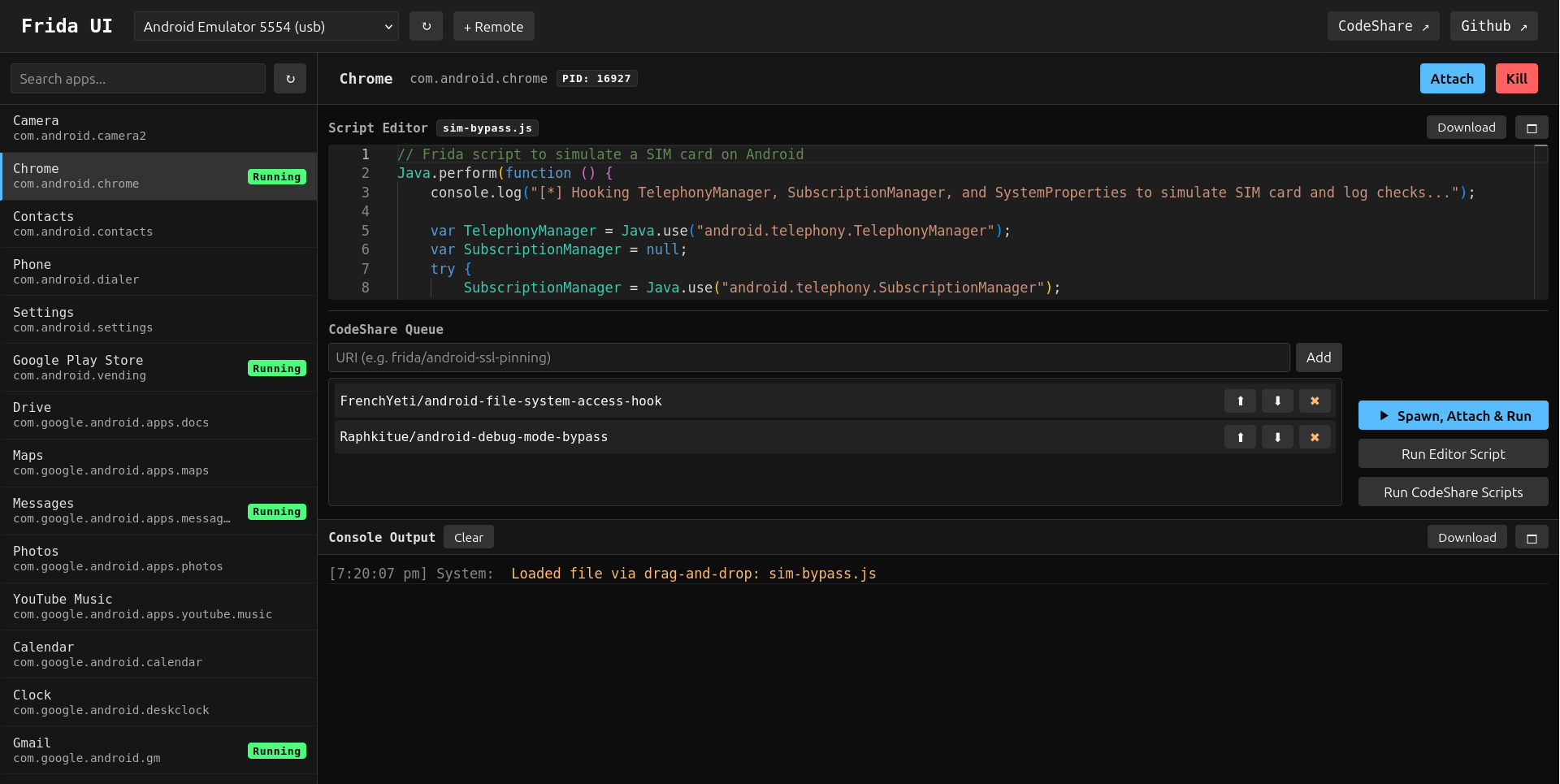
Why I built this?
I wanted a tool that respects the pentester’s workflow. When you are analyzing an app, you want to focus on the logic and the vulnerabilities, not on syntax errors in your CLI arguments. Frida UI is designed to be:
- Fast & Local: It runs entirely on your machine (
localhost). No cloud dependencies. It talks directly to thefrida-serveron your USB-connected Android/iOS devices or remote devices over WiFi. - Visual: See all running processes and installed apps in a searchable list.
- Organized: Manage your custom scripts and CodeShare snippets in one place.
- Lightweight: No heavy IDEs or bloated frameworks. Just a simple web app that opens in your browser.
Key Features and Benefits
1. Seamless Device & Process Management
Forget running frida-ps -Uia repeatedly to find a Process ID. Frida UI auto-detects connected USB devices, while remote TCP devices can be added manually by ip/port. You get a clean sidebar listing every running process and installed application.
- Search: Instant filter by app name or package identifier.
- One-click Actions: Hit Attach to jump into a running process or Spawn to launch an app from scratch (perfect for early-initialization hooks).
2. A Proper Scripting Environment
The built-in editor (powered by Monaco) gives you a VS Code-like experience right in the browser.
- Drag & Drop: Have a pre-written custom frida script in
.js? Just drag it into the editor and start tweaking. - Syntax Highlighting & Autocomplete: Write scripts faster with intelligent code suggestions and error highlighting.
- Save & Load: Iterate on your scripts and save them for later.
3. Integrated CodeShare
This is a game-changer for speed. You often need standard script, like SSL Pinning Bypass or Root Detection Bypass.
- Search & Import: Pull scripts directly from Frida CodeShare inside the UI.
- Script Queueing: You can chain multiple CodeShare scripts and your own custom logic to run simultaneously.
4. Interactive Console
The logging pane isn’t just a text dumps; it handles your console.log output and script errors in real-time, making it easier to spot return values, hex dumps, and stack traces without the noise of a terminal buffers.
Getting Started
Frida UI is a Python tool, so installation is a breeze. I recommend using uv or pipx to keep it isolated.
# Install from PyPI
uv tool install frida-ui

# Or if you want bleeding edge, install from GitHub
uv tool install git+https://github.com/adityatelange/frida-ui.git

# Start the dashboard
frida-ui
Your browser will open to http://127.0.0.1:8000. Connect your device (make sure frida-server is running on it!), and you’ll see it appear in the dropdown.
Summary
My goal with Frida UI wasn’t to replace the CLI for everything, but to make the 90% use case like exploring an app, testing hooks, and bypassing standard protections, much faster and more enjoyable. It’s open source and built for the community.
Check it out on:
Give it a spin on your next engagement and let me know what you think! Happy pentesting! 🕵️♂️🔍📱